
Teleprompter Distance From Camera: Eye Line, Text Size, and Placement
Whether a viewer feels you are looking at them comes down to one angle: the angle at their end between your eyes and the lens. That angle depends on two distances, how far the text sits from the lens and how far you sit from both. Move the text closer to the lens or move yourself further away and the angle shrinks. This guide gives the numbers, then applies them to a phone, a laptop, a tablet rig, and a beam-splitter.
The eye-line angle
Viewers read anything under about three degrees as direct eye contact. Between three and six degrees most people notice something is slightly off without knowing what. Above eight degrees it is obviously a read. The angle is the offset between text and lens divided by your distance from the camera, so the same offset gets more forgiving as you step back.
| Text-to-lens offset | At 0.6 m (arm's length) | At 1 m | At 1.5 m | At 2 m |
|---|---|---|---|---|
| 2 cm (overlay text right under the lens) | 1.9° | 1.1° | 0.8° | 0.6° |
| 5 cm (phone screen top, tablet under camera) | 4.8° | 2.9° | 1.9° | 1.4° |
| 10 cm (laptop window pushed up) | 9.5° | 5.7° | 3.8° | 2.9° |
| 20 cm (script in the middle of a laptop screen) | 18° | 11° | 7.6° | 5.7° |
Two conclusions fall out of the table. First, a script in the middle of a laptop screen at arm's length is never going to look like eye contact. Second, almost any setup works if the text is within a few centimetres of the lens, which is what the overlay layout in Sayscroll's recorder does: the active line sits directly over the camera preview, so the offset is the height of a line of text.
How far away should you sit?
Further is better for eye line and worse for legibility, so the answer is: as far as you can still read comfortably, which is a text-size question. A useful starting point is a font size in points of about twenty times your distance in metres, then adjust until you can take in a whole line without leaning in.
| Distance from screen | Starting font size | Typical use |
|---|---|---|
| 0.5 m | 10–12 pt (phone or tablet in hand) | Selfie-style phone video, desk webcam |
| 1 m | 20–24 pt | Laptop on a stand, tablet under a camera |
| 1.5 m | 30–36 pt | Standing talking-head, tripod-mounted phone |
| 2 m | 40–48 pt | Full-body framing, presentation practice |
| 3 m | 60 pt and up | Stage, lectern with a monitor |
In Sayscroll you set text size, column width, and margins from the reading controls; narrower columns mean shorter lines, which keep the active word closer to the lens and reduce visible eye movement. Bigger text is almost always the right call; the failure mode is squinting, not oversize letters.
Placement by setup
Phone only
Use the front camera, put the phone at eye height on a small tripod, and open Sayscroll full screen with the recorder in overlay layout. The lens is at the top of the screen and the active line floats just under it, so the offset is a few centimetres. Sit or stand about arm's length to a metre away. The iPhone teleprompter page covers adding the app to your home screen so it opens full screen.
Laptop with the built-in webcam
Shrink the browser window to a short, wide strip and drag it to the top edge of the screen, directly under the camera. Raise the laptop so the camera is at eye level; a stack of books is fine. Sit about a metre back at 20-plus point text. The offset is roughly the height of the window, so keep the window short.
Tablet or second screen under a camera
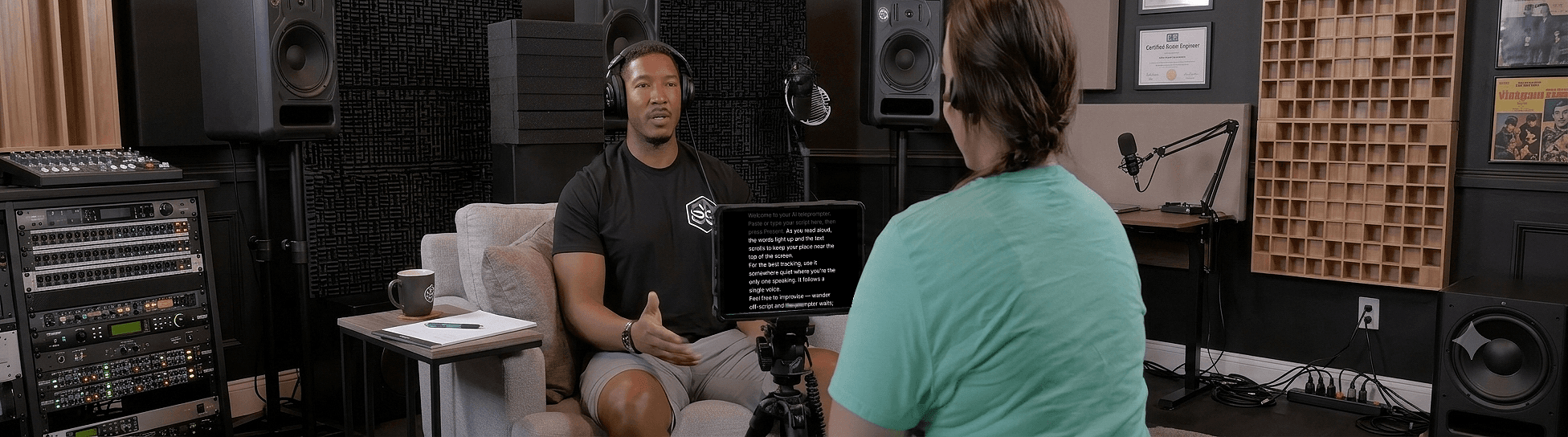
Mount the tablet directly below the lens of a camera on a tripod, screen tilted toward you, top edge as close to the lens as the mount allows. This is the classic creator setup: at 1.5 metres with the text 5 centimetres under the lens, the angle is under two degrees, which reads as eye contact.
Beam-splitter rig
A beam-splitter puts the text on a piece of glass in front of the lens, so the offset is zero. The trade-off is that the glass mirrors the display. Sayscroll has horizontal and vertical mirror controls in the screen menu for exactly this; any phone or tablet in a browser becomes the monitor, with nothing to install.
Three placement mistakes that survive good gear
- Camera below eye level. It shortens your face and makes every downward glance obvious. Raise the lens to eye height, always.
- Text far from the lens because it is easier to read there. Make the text bigger instead of moving it.
- Sitting too close. Arm's length doubles every angle in the table above. Step back and turn the font up.
With the geometry sorted, the rest is delivery: how to read a teleprompter naturally. For full rigs by budget, see the best YouTube teleprompter setup.
Frequently asked questions
How far should a teleprompter be from the camera?
As close as possible: within five centimetres of the lens for a phone or tablet, and directly over it with a beam-splitter. What matters is the angle at the viewer's end, and under about three degrees reads as eye contact.
How far should I stand from the teleprompter?
As far as you can read comfortably. One to one and a half metres is typical for a seated or standing talking-head; increase the font size rather than moving closer. A starting point is 20 points of font size per metre of distance.
Can viewers tell I'm using a teleprompter?
Only if the text is far from the lens or your eyes sweep across long lines. Keep the text close, format the script in short lines, and let the prompter follow your voice so you are not chasing a scroll.
Do I need a beam-splitter teleprompter?
No. A phone or tablet with the text right under the lens gets the angle under two degrees, which viewers read as eye contact. Beam-splitters help when the camera is a large DSLR or cinema body whose lens sits far from any screen.
Keep reading
How to Look Natural on Camera With a Teleprompter
Tips for looking natural on camera with a teleprompter — from eye line and framing to energy, phrasing, and letting your voice control the scroll.
The Best YouTube Teleprompter Setup for Every Budget
Four setups — phone only, laptop and webcam, tablet under a camera, beam-splitter rig — with placement, cost, and the one piece of software that works in all of them.
How to Read a Teleprompter Naturally (Without Sounding Like You're Reading)
The read-aloud sound comes from a few fixable habits: eyes that scan, a pace set by the machine, and breath that never lands. Here's how to fix each one.
Related pages
Teleprompter for YouTube
Look into the lens, say the whole script in one pass, and record it in the same tab — the prompter follows you, not the other way round.
Teleprompter for iPhone
Prop up the phone, open Safari, and let your voice scroll the script — while the same phone films you.
Teleprompter for Mac
A voice-following prompter for any MacBook, iMac, or Mac mini — open it in Safari or Chrome, no App Store needed.
Speak naturally — Let the script follow you
The AI teleprompter that scrolls as you speak — in 60+ languages.