
The Best YouTube Teleprompter Setup for Every Budget
A teleprompter setup has three parts: the camera, the screen showing the words, and the software that moves them. The first two scale with budget from a phone on a tripod to a beam-splitter on a cinema camera. The third does not have to: a browser-based prompter that follows your voice runs on every screen in every setup below, so you can start with the phone and keep the same workflow when you upgrade. Here are the four setups, cheapest first.
Setup 1: Phone only (free)
Front camera, small tripod at eye height, Sayscroll open full screen from the home-screen icon, recorder on in overlay layout. The text floats over the camera preview a couple of centimetres under the lens, so eye line is solved by geometry. Record in one take, save to Photos, edit on the phone or the laptop.
- Cost: nothing beyond a tripod you probably own.
- Best for: Shorts, Reels, quick explainers, anyone starting out.
- Limits: the front camera is the weakest lens on the phone, and the screen is small for long scripts. Use a large text size and short lines.
- Guide: the iPhone teleprompter page covers Safari permissions and adding to the home screen.
Setup 2: Laptop and webcam (free to modest)
The laptop on a stand so the webcam is at eye level, the browser window shrunk to a short strip and pushed to the top edge under the camera, a USB or lapel microphone. If you already record with OBS or another capture tool, keep it and leave Sayscroll on screen; if not, the built-in recorder captures the take. Works the same on Mac and Windows.
- Cost: a laptop stand and a microphone, often under a hundred dollars.
- Best for: tutorials, screen-share explainers, talking heads with a desk background.
- Limits: built-in webcams are soft in low light; add a window or a small panel light in front of you. Keep the prompter window short so the text stays near the lens.
Setup 3: Tablet or second screen under a camera (modest)
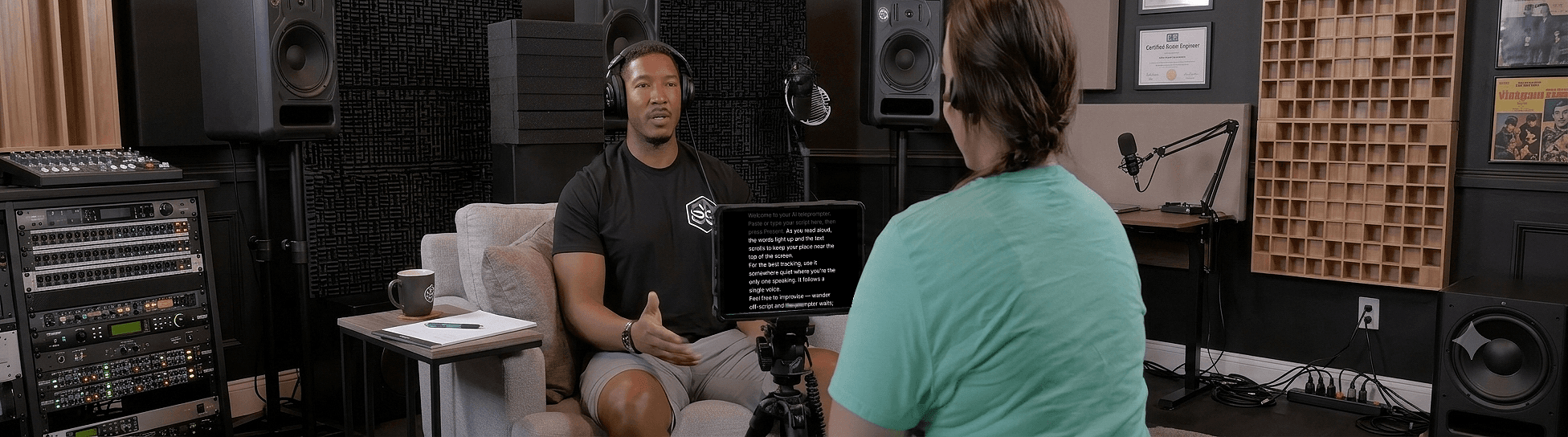
A mirrorless camera or a good phone on a tripod, a tablet mounted directly under the lens on an arm or a second tripod, top edge as close to the lens as the mount allows. Sayscroll runs on the tablet in the browser; the camera records; a lapel mic feeds the camera or a separate recorder. At 1.5 metres with the text five centimetres under the lens, the eye-line angle is under two degrees, which viewers read as eye contact.
- Cost: the camera you have plus a tablet arm, typically twenty to fifty dollars.
- Best for: channels that have outgrown the webcam look, course creators, interviews with a scripted intro.
- Limits: two devices to charge and start; sync the clap in the edit. The tablet needs a connection for live voice tracking.
Setup 4: Beam-splitter rig (professional)
A hood with angled glass mounts in front of the lens; a tablet or phone lies flat below it and reflects onto the glass, so the text appears exactly on the lens axis. The camera shoots through the glass. This is the broadcast setup and it removes the eye-line question entirely. The display has to be mirrored to read correctly through the glass, which Sayscroll does with its horizontal and vertical mirror controls, so any phone or tablet in a browser is the monitor.
- Cost: hoods run from around a hundred dollars for a phone-sized unit to several hundred for a large glass rig, plus the tablet.
- Best for: studio channels, corporate video, anything with a long lens or a large camera body.
- Limits: the glass costs a little light, and a large rig is heavy. Keep the tablet's brightness up.
The four setups compared
| Setup | Typical cost | Eye-line offset | Records with | Upgrade path |
|---|---|---|---|---|
| Phone only | $0 | ~2 cm (overlay) | Sayscroll recorder | Add a tripod and a lapel mic |
| Laptop + webcam | $0–100 | Window height, ~5–10 cm | Sayscroll recorder or OBS | Better light, external webcam at eye level |
| Tablet under camera | $20–50 + camera | ~5 cm | Camera | Beam-splitter hood |
| Beam-splitter | $100–500 + tablet | 0 cm | Camera | Bigger glass, brighter tablet |
The software layer that stays the same
In every setup the words move for the same reason: you said them. Sayscroll's voice-controlled teleprompter listens through the microphone, matches your speech to the script, and keeps the current word at the reading markers, near the top of the screen or in the middle; it waits when you pause and re-syncs after an ad-lib. No remote, no pedal, no scroll speed to tune per script, and nothing to install on the phone, the laptop, or the tablet. When you move from setup one to setup four, the workflow does not change.
Placement angles and text sizes for each setup are in the distance-from-camera guide; the recording workflow itself is in how to record a talking-head video, and there are more delivery tips in teleprompter tips for YouTube.
Frequently asked questions
What teleprompter setup do YouTubers use?
Most start with a phone or a laptop with the script pushed up against the lens, move to a tablet mounted under a camera, and some studio channels use a beam-splitter hood. The software can stay the same throughout: a browser-based voice-following prompter runs on any of those screens.
Do I need a beam-splitter for YouTube?
No. A tablet or phone with the text within a few centimetres of the lens puts the eye-line offset under two degrees, which viewers see as eye contact. Beam-splitters matter when the camera body or lens is large and no screen can sit close to the axis.
Can I use my phone as a teleprompter for a camera?
Yes. Mount it just under the camera lens, open Sayscroll in the browser, and mirror the display if you are using it inside a beam-splitter hood. The script follows your voice through the phone's microphone.
What is the cheapest teleprompter setup?
A phone on a tripod with Sayscroll open in overlay layout. It costs nothing, the text sits right under the front camera, and the built-in recorder saves the take to your camera roll.
Keep reading
Teleprompter Tips for YouTube Creators
Script, setup, and delivery tips for using a teleprompter on YouTube — batching, sponsor reads, Shorts — and how voice following cuts your takes from five to one.
How to Record a Talking-Head Video (Setup, Script, and Delivery)
Camera, framing, light, sound, script, prompter, delivery: the complete talking-head recipe, with the choices that matter and the ones that don't.
Teleprompter Distance From Camera: Eye Line, Text Size, and Placement
Eye contact on camera is geometry: the angle between the lens and the text. Here are the numbers for distance, offset, and text size on every kind of setup.
Related pages
Teleprompter for YouTube
Look into the lens, say the whole script in one pass, and record it in the same tab — the prompter follows you, not the other way round.
Teleprompter for iPhone
Prop up the phone, open Safari, and let your voice scroll the script — while the same phone films you.
Teleprompter for Mac
A voice-following prompter for any MacBook, iMac, or Mac mini — open it in Safari or Chrome, no App Store needed.
Speak naturally — Let the script follow you
The AI teleprompter that scrolls as you speak — in 60+ languages.