
How to Record a Talking-Head Video (Setup, Script, and Delivery)
A talking-head video is a person, a camera, and something worth saying. The format is simple, which is why every weakness shows: bad light, thin sound, a wandering eye line, a delivery that sounds read. This guide goes through the whole recipe in the order you should set it up, with the choices that change the result and the ones that only change the invoice.
1. Camera: use what you have, at eye level
A recent phone's front camera, a laptop webcam, or a mirrorless body all produce a usable talking head in good light. The thing that matters more than the sensor is height: the lens must be at eye level. A camera below your eyes shortens the face and makes every glance at a script obvious; a camera above flatters slightly and is the safer error. Use a tripod or a stack of books.
2. Framing: head and shoulders, eyes on the upper third
Frame from mid-chest up with a little headroom, eyes about a third of the way down from the top. Landscape for YouTube and presentations, portrait for Shorts, Reels, and TikTok; if you will post both, record landscape wide enough to crop a vertical from the centre. Sit or stand about a metre from the lens and leave the background simple: a wall, a bookshelf, a window behind the camera rather than behind you.
3. Light: one big soft source, in front of you
Face a window in daylight and you are done. If not, one soft light (a panel with a diffuser, or a lamp bounced off a white wall) placed just above the camera and slightly to one side does ninety percent of the job. Avoid overhead room light alone, which puts shadows in the eye sockets, and never put the window behind you.
4. Sound: the microphone close, the room quiet
Viewers forgive soft video and punish bad audio. A lapel mic clipped fifteen centimetres below your chin, or a USB mic just out of frame, beats any camera's built-in microphone. Turn off fans and air conditioning, close the door, and put a rug or a blanket down if the room echoes. A close mic also helps a voice-following prompter, since it hears you and not the room.
5. Script: written for the ear, sized to the clock
Write in spoken sentences, one idea per line, numbers as words. At a conversational pace, a minute is about 140 words; the 5-minute video word count table covers every length from thirty seconds to thirty minutes. Read it aloud once before you set up the camera and cut what you stumble on. The detailed method is in how to write a teleprompter script.
6. Prompter: text next to the lens, following your voice
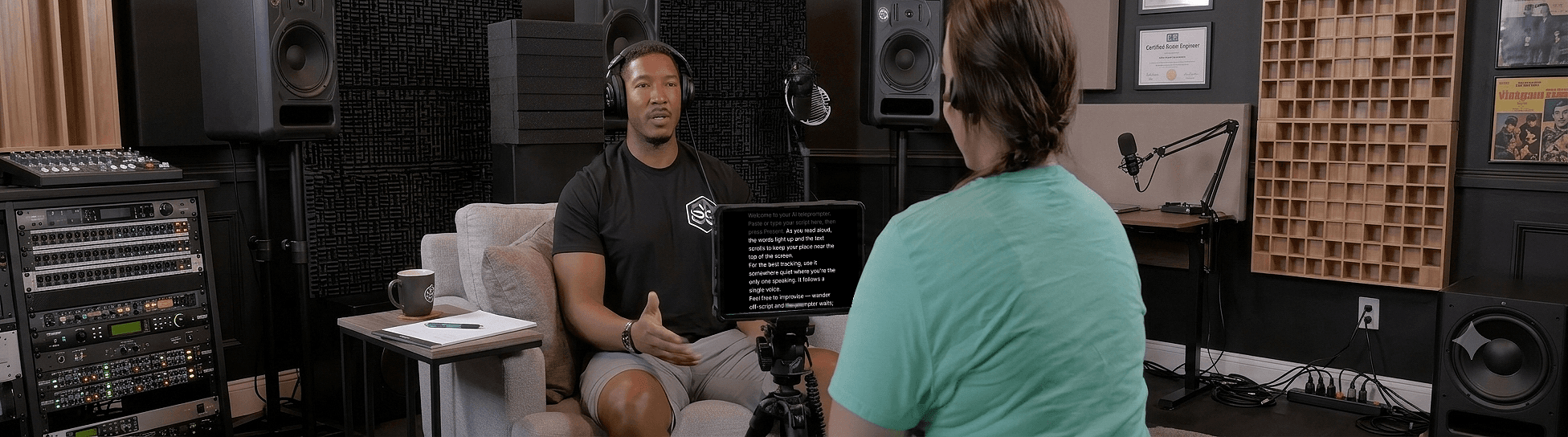
Put the script as close to the lens as physically possible so looking at the words is looking at the viewer. On a phone or laptop, open Sayscroll in the browser, paste the script, and turn on the built-in recorder in overlay layout, which floats the text over the camera preview. On a camera rig, mount a tablet under the lens or use a beam-splitter with the mirror controls. The placement guide has the angles.
Then let the prompter follow you rather than the other way round. Sayscroll matches the words you say to the script and keeps the current one at the reading markers (near the top of the screen, or in the middle if you prefer); it waits when you pause and re-syncs after an ad-lib or a repeated line. That is the difference between reading and talking on camera. It works in 60+ languages, so a bilingual script is fine. See the voice-controlled teleprompter page for how it handles going off script.
7. A pre-roll checklist
- Lens at eye height, eyes on the upper third, background clean.
- Light in front, window not behind.
- Microphone close, room quiet, levels checked with a test sentence.
- Script pasted, text size set so you can read a whole line without leaning in.
- Microphone permission granted in the browser; a two-line test read to confirm tracking.
- Phone on Do Not Disturb, notifications off on the laptop.
- Water within reach, out of frame.
8. Record: one long take, restarts in place
Start recording, clap once for a sync point if you are also recording audio separately, and read. When you flub a line, pause, say it again, and continue; the prompter follows you back to the repeated sentence and the first attempt gets cut later. Keep rolling through the whole script. One continuous file with restarts edits faster than many short clips, and your energy stays up. Takes save to your device as MP4 or WebM; on iPhone the share sheet drops them into Photos.
9. Delivery: talk to one person, bring more energy
Pick one specific viewer and talk to them. Lift your energy a notch above what feels normal, because the camera flattens it. Read in phrases, breathe at the punctuation, use your hands. The techniques are in how to read a teleprompter naturally; do a twenty-second throwaway take and listen back before the real one.
10. Edit: cut the restarts, add nothing you don't need
Find each restart on the waveform, delete the first attempt, tighten the pauses that run long, and add a title if you want one. A good talking head does not need B-roll, music, or jump-cut effects to hold attention; it needs a clear script and a person who sounds like they mean it. Ship it.
For rigs by budget, from phone-only to beam-splitter, see the best YouTube teleprompter setup.
Frequently asked questions
What equipment do I need to record a talking-head video?
A phone or laptop camera at eye level, a window or one soft light in front of you, and a microphone close to your mouth. A teleprompter next to the lens replaces memorizing. Everything else is optional.
How do I look at the camera and read at the same time?
Put the text within a few centimetres of the lens: the overlay layout in Sayscroll's recorder floats the script over your camera preview, and a tablet under a camera lens does the same on a rig. Under about three degrees of offset, viewers see eye contact.
Should I record one long take or many short ones?
One long take with restarts in place. Re-read each flubbed line and keep going; a voice-following prompter re-syncs to the repeat, and you delete the first attempts in the edit. It is faster to edit and keeps your energy consistent.
How long should a talking-head video be?
As long as the idea needs and no longer. Most tutorials and explainers land between three and eight minutes, about 400 to 1,100 words at a conversational pace. Use the script timing calculator to check a draft before you record.
Keep reading
The Best YouTube Teleprompter Setup for Every Budget
Four setups — phone only, laptop and webcam, tablet under a camera, beam-splitter rig — with placement, cost, and the one piece of software that works in all of them.
Teleprompter Distance From Camera: Eye Line, Text Size, and Placement
Eye contact on camera is geometry: the angle between the lens and the text. Here are the numbers for distance, offset, and text size on every kind of setup.
How to Look Natural on Camera With a Teleprompter
Tips for looking natural on camera with a teleprompter — from eye line and framing to energy, phrasing, and letting your voice control the scroll.
Related pages
Teleprompter for YouTube
Look into the lens, say the whole script in one pass, and record it in the same tab — the prompter follows you, not the other way round.
Online Teleprompter
Open a tab, paste your script, allow the microphone, and read. Nothing to install on any device.
Voice-Controlled Teleprompter
The script moves because you are speaking — it starts when you start, waits when you pause, and needs no remote, pedal, or operator.
Speak naturally — Let the script follow you
The AI teleprompter that scrolls as you speak — in 60+ languages.