
The AI Teleprompter that scrolls as you speak
Your script automatically follows your voice, so you can speak naturally and maintain eye contact. Get it right the first time, recording or live. Try it below.
Free demo — paste your script up to 700 characters. Subscribe for unlimited script length plus monthly speech hours.
As seen on
- USA Today
- NBC
- CBS
- abc
Old teleprompters make you chase the text
Speak too fast?
You lose your place.
Speak too slow?
The text runs away.
Chasing the scroll?
You sound robotic.
Multiple takes
Eat your whole day.
Sayscroll follows your voice automatically.
Try the teleprompterAI Voice-Controlled Teleprompter
Sayscroll keeps your script perfectly aligned with your voice.
Paste your script
Drop in a speech, a video script, or rough notes — in any of 60+ languages, even mixed in the same paragraph
Hit Start
Words fade out as you say them and the text scrolls to keep your place at the reading markers — near the top of the screen or in the middle, your choice
Go off script anytime
Improvise freely. The prompter waits for you and locks back on the moment you return to the text — or scroll to any line to continue from there
Speak naturally — Let the script follow you
Perfect for YouTube creators, presenters, educators, podcasters, and content teams.
Welcome back to the studio. Today I want to show you how a script can follow your voice — word by word, at the pace you actually speak. [Smile] Go ahead, improvise. It will be right here when you come back.
Voice tracking
Real-time speech recognition fades out every word you say and keeps your place at the reading markers — no fixed scroll speed. Put cues like [smile] in square brackets: they show in orange and voice tracking skips them
Go off script, freely
Improvise as long as you like. The prompter waits while you go off script and locks back on when you return. Need another section? Scroll to it and read on from there
60+ languages, even mixed
Works with English, Spanish, German, French, Swedish and dozens more. Even with multilingual scripts

Hit record and read — your script floats right over the video.
Built-in video recorder
Turn on your camera and record takes right in the teleprompter — with the script overlaid on your video or in a split-screen layout. Recordings save straight to your device; nothing is uploaded
Studio-ready reading controls
Adjustable text size and column width, paragraph alignment, fullscreen, microphone selection, reading markers near the top or in the middle of the screen, plus horizontal and vertical mirroring for professional beam-splitter teleprompter screens
Browser Based
No installation required. On a phone or tablet, add it to your home screen and use it like an app. Your script stays on your device — only audio is streamed for transcription
From a few videos to all day
Usage-based monthly hours. Only live mic time counts. Cancel anytime.
Starter
-50% first monthFirst month, then $10/mo
Starter pricing, professional results
- 10 hours of teleprompter use per month
- Unlimited script length
- 99% accurate voice tracking
- 60+ languages, including mixed scripts
- Built-in video recorder
Creator
-50% first monthFirst month, then $20/mo
For creators and speakers who record daily
- 30 hours of teleprompter use per month
- Unlimited script length
- 99% accurate voice tracking
- 60+ languages, including mixed scripts
- Built-in video recorder
Pro
-50% first monthFirst month, then $50/mo
For studio professionals who go live all day
- 100 hours of teleprompter use per month
- Unlimited script length
- 99% accurate voice tracking
- 60+ languages, including mixed scripts
- Built-in video recorder
Built for creators & speakers
Sayscroll is by far the most versatile and useful teleprompter app I've tried so far (and I've tried them all). I love that I can use it on any of my devices, and it simply works, no complicated downloads, installation, or hardware requirements. Just works. The cherry on top is the level of customer service. They really consider every piece of feedback and suggestion. Great job, Sayscroll team!
We replaced a hardware prompter and a volunteer operator. It reads with the speaker and never runs ahead, even when a line gets repeated for emphasis.
As a non-native English speaker I pause a lot to find the right word. Fixed-speed prompters stressed me out — this one just breathes with me.
The voice tracking works extremely well, going off-script while speaking works so smoothly, and even switching between English and German has been great. So first of all: very well done.
The auto-pause is quietly brilliant. Silence doesn't burn my minutes, and resuming is one click. I use about two hours a month and it's plenty.
I jump between sections constantly during live demos. It finds where I am in the script every single time. Honestly feels like magic.
Frequently asked questions
Short answers about the teleprompter & billing.
What is Sayscroll?
Sayscroll is a browser-based AI teleprompter that follows your voice automatically. Unlike traditional teleprompters that run on a fixed scroll speed you have to adjust, Sayscroll uses real-time speech recognition to track your words as you say them and keep your place at the reading markers, near the top of the screen or in the middle. If you improvise or go off script, it waits, then locks back on the moment you return. It supports 60+ languages, including scripts that mix languages, with 99% tracking accuracy. You can even record yourself on camera right in the prompter and save the takes to your device. No install, usage-based pricing.
How is Sayscroll different from traditional teleprompters?
Traditional teleprompters require manual speed adjustment. Sayscroll follows your voice automatically.
Is Sayscroll right for me?
Sayscroll is built for creators, presenters, educators, podcasters and public speakers. Whether you're recording a YouTube video, delivering a keynote, teaching a course or hosting a webinar, Sayscroll keeps your script perfectly aligned with your voice
How does the teleprompter follow my voice?
Your microphone audio is transcribed in real time and matched word-by-word against your script. Spoken words fade out and the text scrolls so the active word stays at the reading markers — near the top of the screen by default, or in the middle if you prefer.
What happens if I go off script?
Nothing — that's the point. The prompter pauses while you improvise and automatically locks back on when you return to your text, even if you re-read an earlier sentence or skip a few lines. To continue from a different part of the script, simply scroll to it: everything above the line you choose is marked as read, and the prompter follows your voice from there.
Can I add notes or stage directions that the prompter won't wait for?
Yes. Put anything that isn't meant to be said in square brackets — [smile], [next slide], [hold up the product]. These notes show in orange in the prompter and voice tracking skips them, so you never have to speak them. A note ends at its closing bracket or at the end of the line.
Can I jump to a different part of the script while presenting?
Yes. Scroll the script with your mouse wheel, trackpad, or a finger on your phone until the line you want to read next sits between the two markers at the edges of the screen, then just keep reading. A thin guide line appears while you scroll to show where the prompter will pick up. The words above that line are marked as read, and the prompter follows your voice from there. There is nothing to tap and no mode to switch.
Can I record video with the teleprompter?
Yes. Sayscroll has a built-in video recorder: turn on your camera in the prompter and record yourself while the script follows your voice. Read with the text overlaid on your camera preview or in a split-screen layout, capture as many takes as you like, and save the keepers straight to your device as regular video files (MP4 or WebM). Your video never leaves your browser — nothing is uploaded.
Does Sayscroll work in multiple languages?
Yes. Sayscroll supports more than 60 languages, and you can mix languages inside one script. The full list, grouped by script with what to expect from each, is on the teleprompter languages page. Languages: Afrikaans, Albanian, Arabic, Azerbaijani, Basque, Belarusian, Bengali, Bosnian, Bulgarian, Catalan, Chinese, Croatian, Czech, Danish, Dutch, English, Estonian, Finnish, French, Galician, German, Greek, Gujarati, Hebrew, Hindi, Hungarian, Indonesian, Italian, Japanese, Kannada, Kazakh, Korean, Latvian, Lithuanian, Macedonian, Malay, Malayalam, Marathi, Norwegian, Persian, Polish, Portuguese, Punjabi, Romanian, Russian, Serbian, Slovak, Slovenian, Spanish, Swahili, Swedish, Tagalog, Tamil, Telugu, Thai, Turkish, Ukrainian, Urdu, Vietnamese, Welsh
How is usage counted?
Only the time the microphone is actively listening counts against your monthly hours. The mic pauses automatically after 30 seconds of silence and stops when you reach the end of your script or exit presentation mode.
What do I get for free?
You can use the teleprompter on this page with scripts up to 700 characters, no account needed. Subscribing removes the length limit and unlocks your monthly speech time.
Can I cancel anytime?
Yes. Subscriptions are managed through our payment partner Polar and can be cancelled from the billing portal with one click. You keep your remaining time until the end of the billing period.
Can I add Sayscroll to my phone or tablet like an app?
Yes. Sayscroll runs in your browser, but you can add it to your iPhone or Android home screen for a one-tap, full-screen experience — no App Store or Play Store download needed. Follow the step-by-step guide: how to add Sayscroll to your iPhone or Android home screen.
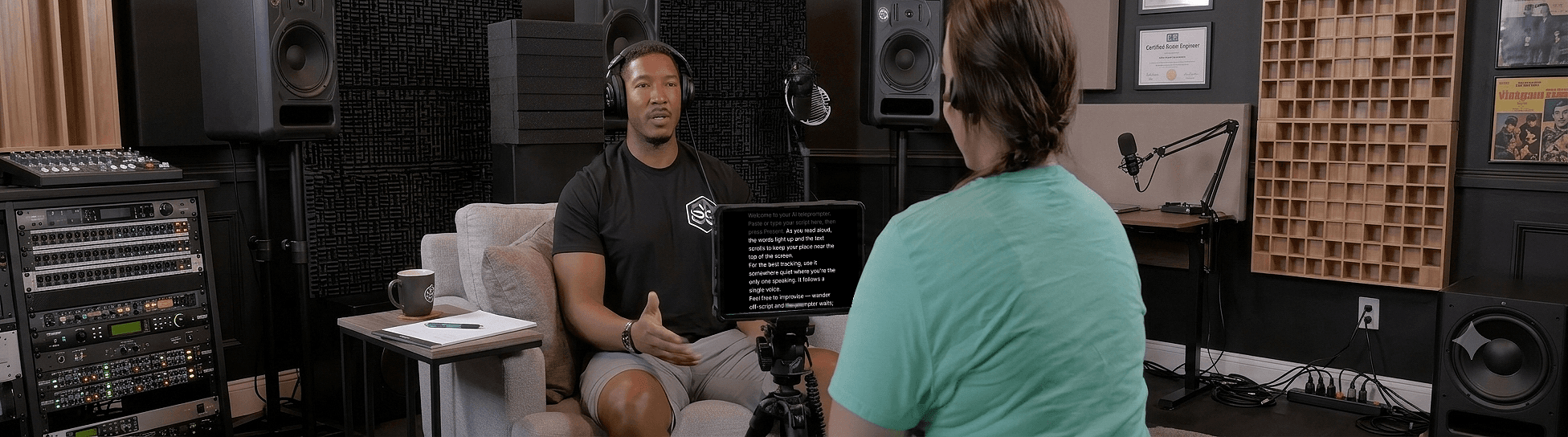
Speak naturally — Let the script follow you
The AI teleprompter that scrolls as you speak — in 60+ languages.