
How to Use a Teleprompter: The Complete Guide
A teleprompter shows your script on a screen near the camera or the audience so you can read it while looking at them. That is the whole idea, and it has not changed since the first paper-roll prompters of the 1950s. What has changed is who operates it. A classic prompter needed a person or a motor to scroll the text at the reader's speed; a modern one can listen and scroll itself. This guide covers using either kind well, in six steps, with the settings that matter and the problems that come up on the first day.
Before you start: what kind of prompter do you have?
Prompters differ in one important way: what moves the text. A fixed-speed (auto-scroll) prompter moves it at a rate you set in advance. A voice-controlled prompter moves it in response to the words you say, using speech recognition to match your voice to the script. The steps below apply to both; the notes marked *voice* apply to a voice-following prompter such as Sayscroll, which runs in the browser on any device. The differences are laid out in voice-controlled vs fixed-speed teleprompters.
1. Load and format your script
Paste the script into the prompter as plain text. Then format it for the eye, not the page: one phrase per line, five to nine words each, a line break wherever you would breathe, and a blank line between ideas. Write numbers as words and acronyms as you say them. Short lines let your eyes take in a whole phrase with one glance and say it to the lens, which is the core skill of reading without looking like you are reading. The full method is in how to write a teleprompter script.
*Voice:* write exactly the words you will say. Speech recognition matches the spoken form, so “twenty twenty-six” tracks and “2026” makes you hesitate. Sayscroll keeps your line structure exactly as pasted.
2. Position the screen next to the lens
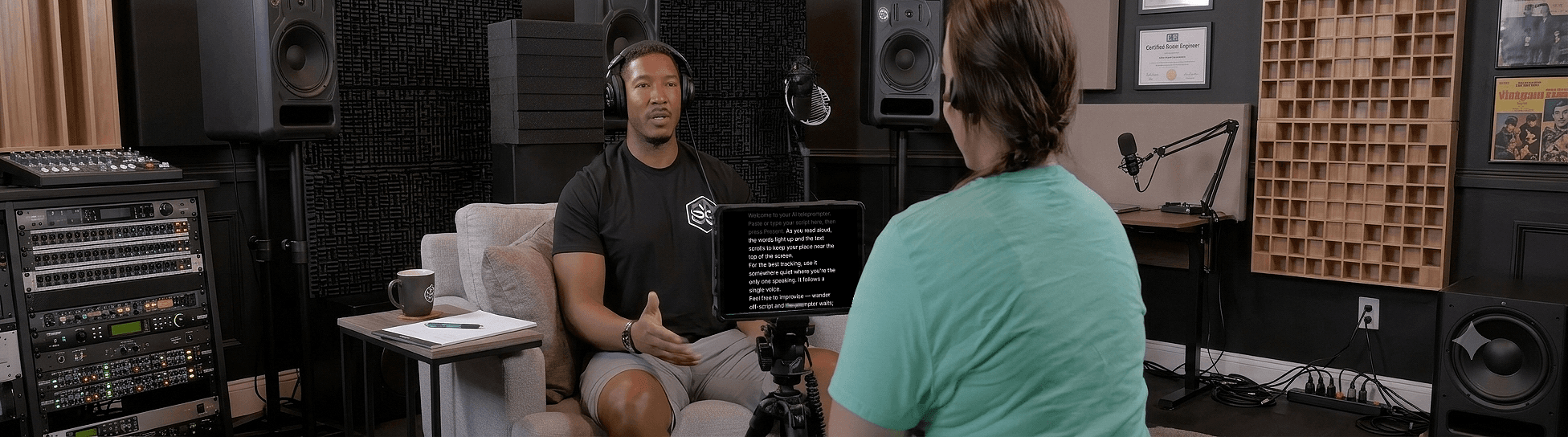
The closer the text is to the lens, the more it looks like eye contact. On a phone, that means the top of the screen, right under the front camera. On a laptop, shrink the browser window to a strip and push it up against the webcam. On a camera rig, mount a tablet directly under the lens or use a beam-splitter. Whatever the setup, get the lens to eye height; a camera below your eyes makes every glance obvious. The distance-from-camera guide gives the angles and text sizes.
*Voice:* if you record inside Sayscroll, the overlay layout floats the script over your camera preview so the active line sits a couple of centimetres from the lens, which is as close as it gets without glass.
3. Set the text size for your distance
Increase the font until you can read a full line without leaning in, from where you will actually stand or sit. A starting point is about twenty points of font size per metre of distance: 20-point at arm's length on a laptop, 40-point at two metres. Then narrow the column so lines stay short. Bigger is almost always right; squinting is the failure mode, not oversized letters.
4. Dial in the display settings
Beyond text size, the settings that change how a read looks are column width and margins (shorter lines mean fewer eye movements), alignment (left-aligned or centred, whichever your eyes find faster), and dark mode, which cuts glare and the reflection of the screen in your glasses. Sayscroll has all of these in the reading controls, plus horizontal and vertical mirroring for beam-splitter rigs and a fullscreen mode (press F; Esc to leave it).
5. Let your voice set the pace
On a fixed-speed prompter, this step is a negotiation: set the speed so the reading line reaches the end of the first paragraph when you do, rehearse once, and accept that any pause longer than a breath will cost you a retake. If you have to do it, teleprompter scroll speed explains how to convert your words per minute into a setting.
*Voice:* there is nothing to set. Press Present and talk. Sayscroll transcribes your speech in real time and moves the script to keep the word you are saying centred. Speed up and it keeps up; pause and it waits; after thirty seconds of silence it pauses fully and resumes on a tap. Go off script, take a question, or repeat a sentence and it holds, then re-syncs the moment you say the next scripted phrase. This is what makes delivery sound natural, and it depends entirely on the tracking holding; the voice-controlled teleprompter page explains exactly what happens when you improvise.
6. Do a test take, then record
Record twenty seconds and play it back. Check three things: your eyes stay near the lens, your pace sounds like conversation, and you can read the whole line without moving your head. Adjust size or position, then record the real take in one go, re-reading any flubbed line in place rather than stopping. Sayscroll's built-in recorder captures the camera and microphone in the same tab; takes save to your device as MP4 or WebM (on iPhone, straight to Photos), and nothing is uploaded.
Common problems on the first day
| Problem | Cause | Fix |
|---|---|---|
| Text runs ahead of me | Fixed speed set too fast, or a pause | Slow the setting, or use a voice-following prompter that waits |
| I look like I'm reading | Text too far from the lens; long lines | Move the text to the lens; format in five-to-nine-word lines |
| Voice tracking doesn't start | Microphone permission denied in the browser | Allow the mic in the address bar, reload, and speak a test line |
| Tracking drifts on a name or number | Script spelled differently from how it's said | Write the spoken form: “Doctor Win”, “fifteen percent” |
| The prompter jumped to the wrong place | A long skip, further than the prompter follows on its own | Scroll to the line you want; the prompter continues from there |
| The text is mirrored/backwards | Beam-splitter glass | Use the mirror controls in the screen menu |
Using a teleprompter for live speaking
On stage, the prompter is a laptop or tablet at the lectern, or a downstage monitor. The same rules apply: big text, short lines, and a pace set by you rather than a motor. A voice-following prompter is especially useful live, because a pause for laughter or a question does not leave the text a paragraph ahead. The public speaking page covers the stage setup, and teleprompter for presentations covers slides and webinars.
For the delivery side, read how to read a teleprompter naturally. For the wider on-camera checklist, see how to look natural on camera.
Frequently asked questions
How do you read a teleprompter without looking like you're reading?
Keep the text close to the lens, format the script in short phrase-length lines, and use a voice-following prompter so you control the pace. Practice a take or two so your eyes settle near the camera.
How far should a teleprompter be from you?
Far enough that your eyes don't visibly move across the text — usually your normal filming distance, about a metre. Increase the font size so you can still read it comfortably at that range, roughly twenty points per metre.
Do I need special hardware to use a teleprompter?
No. A browser-based teleprompter like Sayscroll works on your laptop, phone, or tablet. A beam-splitter rig can help for studio setups, but it isn't required — and if you use one, Sayscroll has built-in horizontal and vertical mirror controls so the text reads correctly through the glass.
Can a teleprompter record video at the same time?
Sayscroll can. Turn on the built-in video recorder and your camera preview appears behind or below the script while it follows your voice. Finished takes save to your device as regular video files (MP4 or WebM) — no separate recording app needed, and nothing is uploaded.
What do I do if the prompter loses my place?
On a fixed-speed prompter, stop and restart the scroll. On Sayscroll, just keep reading: it re-syncs when you say the next scripted phrase, and for a long jump you scroll to the section by hand and the prompter continues from the line you scroll to.
Keep reading
How to Read a Teleprompter Naturally (Without Sounding Like You're Reading)
The read-aloud sound comes from a few fixable habits: eyes that scan, a pace set by the machine, and breath that never lands. Here's how to fix each one.
How to Write a Teleprompter Script That Reads Well Aloud
A script written for the page fights you on camera. Here's how to write one for the ear — structure, line breaks, numbers, names — with a worked example.
Teleprompter Scroll Speed: How Fast Should a Teleprompter Scroll?
Scroll speed is words per minute in disguise. Here's how to convert your pace into a setting, why the number on the slider means nothing, and the way to skip the problem.
Related pages
Online Teleprompter
Open a tab, paste your script, allow the microphone, and read. Nothing to install on any device.
Teleprompter for YouTube
Look into the lens, say the whole script in one pass, and record it in the same tab — the prompter follows you, not the other way round.
Voice-Controlled Teleprompter
The script moves because you are speaking — it starts when you start, waits when you pause, and needs no remote, pedal, or operator.
Speak naturally — Let the script follow you
The AI teleprompter that scrolls as you speak — in 60+ languages.